




Avatar
Avatar
Avatar
Avatar

Rated 4.97/5 from 500+ reviews

Avatar
Avatar
Avatar
Avatar

Rated 4.97/5 from 500+ reviews

Avatar
Avatar
Avatar
Avatar

Rated 4.97/5 from 500+ reviews

AI that helps teams scale growth, not just output

Checkgrow brings knowledge, strategy, execution, and AI into one connected platform. Every feature is designed to reduce noise, preserve context, and help teams move faster without losing clarity.

Knowledge Center

The Knowledge Center captures and organises everything that defines your business. From brand positioning and products to audiences and competitors with AI-ready context that powers every feature across the platform.

including:

AI-powered data entry from files or natural language

AI-powered data entry from files or natural language

AI-powered data entry from files or natural language

Automated multi-step background enrichment

Automated multi-step background enrichment

Automated multi-step background enrichment

Conversational updates through the Knowledge Assistant

Conversational updates through the Knowledge Assistant

Conversational updates through the Knowledge Assistant

Smart extraction from pitch decks, docs, and websites

Smart extraction from pitch decks, docs, and websites

Smart extraction from pitch decks, docs, and websites

Real-time sync across campaigns, agents, and objectives

Real-time sync across campaigns, agents, and objectives

Real-time sync across campaigns, agents, and objectives

AI Assistant

The AI Assistant is grounded in your company’s knowledge, objectives, and positioning. It delivers precise, relevant responses without constant re-prompting or explanation.

including:

Knowledge-grounded responses

Knowledge-grounded responses

Knowledge-grounded responses

Specialised AI brains by role

Specialised AI brains by role

Specialised AI brains by role

Multi-model support (GPT, Gemini, Perplexity...)

Multi-model support (GPT, Gemini, Perplexity...)

Multi-model support (GPT, Gemini, Perplexity...)

Team commenting with in-chat interaction

Team commenting with in-chat interaction

Team commenting with in-chat interaction

Language flexibility with context accuracy

Language flexibility with context accuracy

Language flexibility with context accuracy

Ai Agents

AI Agents are purpose-built specialists that generate ready-to-use outputs. Each agent follows structured workflows and produces assets that require minimal editing before deployment.

including:

20+ specialised growth agents

20+ specialised growth agents

20+ specialised growth agents

Team shared responses

Team shared responses

Team shared responses

Structured, channel formated outputs

Structured, channel formated outputs

Structured, channel formated outputs

Multiple options per request

Multiple options per request

Multiple options per request

Smart integrations with instant actions

Smart integrations with instant actions

Smart integrations with instant actions

80%

Less internal back-and-forth between teams

80%

Less internal back-and-forth between teams

80%

Less internal back-and-forth between teams

€7,000

Savings per month (approx)

€7,000

Savings per month (approx)

€7,000

Savings per month (approx)

More experiments launched per quarter

More experiments launched per quarter

More experiments launched per quarter

Operational Center

Operational Center brings all growth operations into one workspace. Tasks, objectives, campaigns, audiences, and conversions stay connected, so teams can move between planning and execution without losing context.

including:

AI Agents running autonomously across company sectors

AI Agents running autonomously across company sectors

AI Agents running autonomously across company sectors

Automated sales lead generation and qualification

Automated sales lead generation and qualification

Automated sales lead generation and qualification

AI-generated campaigns, creatives, and assets

AI-generated campaigns, creatives, and assets

AI-generated campaigns, creatives, and assets

Audience and objective management with AI

Audience and objective management with AI

Audience and objective management with AI

Analytics connected to AI-driven reporting

Analytics connected to AI-driven reporting

Analytics connected to AI-driven reporting

Marketing Campaigns

Checkgrow generates complete marketing campaign briefings based on your audience, goals, and budget. Each campaign is structured by funnel stage, with clear messaging, hooks, and budget allocation built in.

including:

Full-funnel campaign briefings

Full-funnel campaign briefings

Full-funnel campaign briefings

Interactive budget allocation per stage

Interactive budget allocation per stage

Interactive budget allocation per stage

Short sprints or long-term planning options

Short sprints or long-term planning options

Short sprints or long-term planning options

Automatic audience and ICP alignment

Automatic audience and ICP alignment

Automatic audience and ICP alignment

Conversion-ready tracking with UTM support

Conversion-ready tracking with UTM support

Conversion-ready tracking with UTM support

Sales Campaigns

Sales Campaigns create tailored B2B playbooks for each audience and sales rep. From LinkedIn DMs to objection handling and lead discovery, everything is generated with real context and ownership.

including:

Personalised outreach templates

Personalised outreach templates

Personalised outreach templates

Smart objection handling based on positioning

Smart objection handling based on positioning

Smart objection handling based on positioning

Event and conference discovery

Event and conference discovery

Event and conference discovery

Automated lead research and enrichment

Automated lead research and enrichment

Automated lead research and enrichment

User-level ownership of sales operations

User-level ownership of sales operations

User-level ownership of sales operations

"We've learned a lot from our engagement, from SEO to
Linkedin Advertising. We're in a much better position
to market our services now."

Man in a dark sweater and woman in glasses wearing a navy blouse, sitting together at a desk with a laptop and smiling.

Proven 2×–7× results across enterprise teams

Proven 2×–7× results across enterprise teams

Proven 2×–7× results across enterprise teams

Market Radar

Radar scans Web and Social Media for relevant discussions and helps your team respond with authentic, on-brand comments. Engagement happens directly from Checkgrow, without manual searching or copy-paste.

including:

Keyword-based LinkedIn scanning

Keyword-based LinkedIn scanning

Keyword-based LinkedIn scanning

AI-generated natural comments

AI-generated natural comments

AI-generated natural comments

Direct posting from the platform

Direct posting from the platform

Direct posting from the platform

Duplicate engagement prevention

Duplicate engagement prevention

Duplicate engagement prevention

Clear credit usage visibility
Clear credit usage visibility

Clear credit usage visibility

Integrations

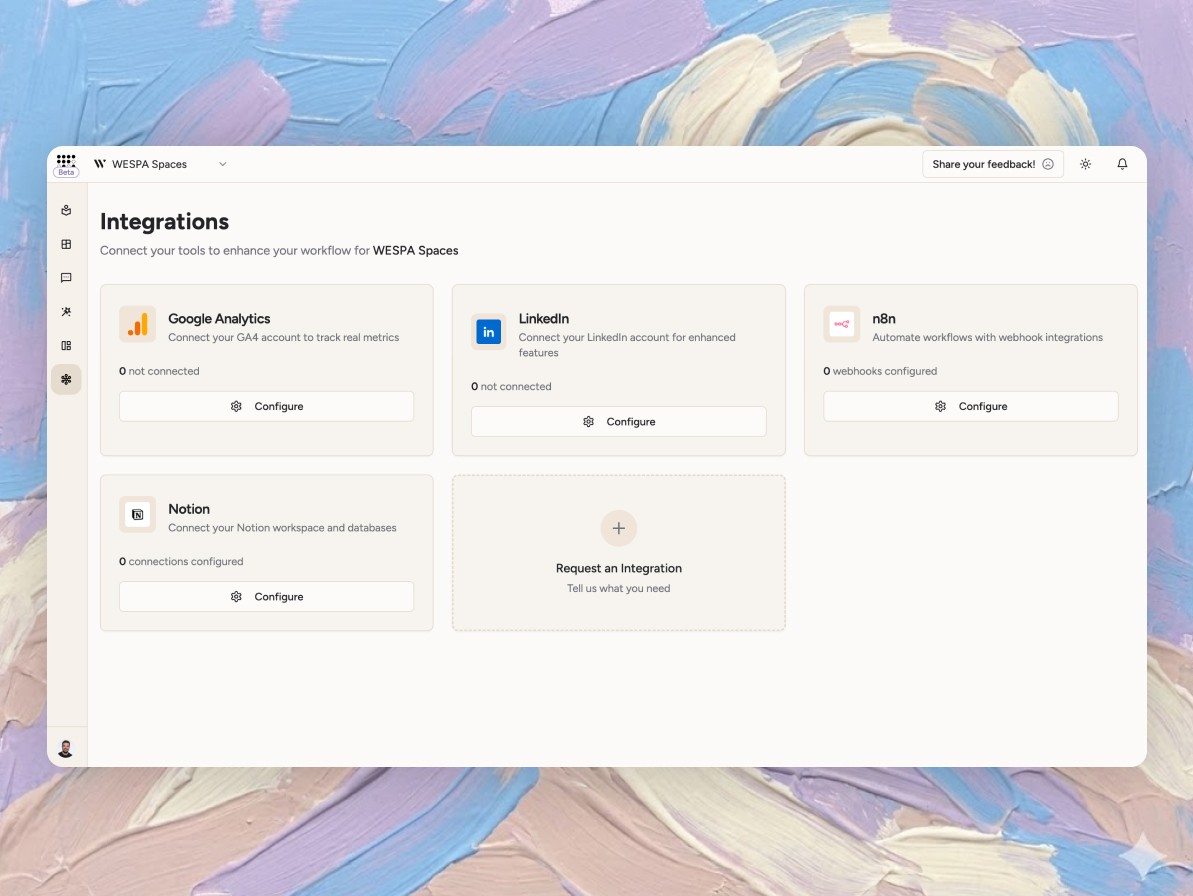
Integrations keep your data and outputs flowing between Checkgrow and the tools you already use. Automate actions, sync documentation, and activate workflows without breaking context.

including:

Native LinkedIn account connection

Native LinkedIn account connection

Native LinkedIn account connection

n8n automation via webhooks

n8n automation via webhooks

n8n automation via webhooks

Notion workspace synchronisation

Notion workspace synchronisation

Notion workspace synchronisation

Per-company configuration control

Per-company configuration control

Per-company configuration control

Secure credential storage

Secure credential storage

Secure credential storage

common questions

We’re here to help you clear the path.

Checkgrow is all about clarity. If you can’t find the answer you’re looking for, we’re just a message away and always happy to help.

Product Features

Getting Started

Support and Feedback

Pricing & Billing

What is the Knowledge Center and how does it work?

Think of the Knowledge Center as your brand’s source of truth. By simply entering your URL, our AI scans your entire digital presence to grasp your identity, audience, and market position. You can keep it evolving by dropping in PDFs, docs, or even brief text updates. This is a living database that ensures your AI assistants always speak your language.

How do AI Agents differ from the AI Assistant?

It’s the difference between a consultant and a dedicated team. Your AI Assistant is your on-call marketing expert. Perfect for quick brainstorming, guidance, and strategic questions. AI Agents, on the other hand, are your builders. They execute structured, high-impact tasks like campaign strategies and content briefs. One advises, the other delivers, and both use your Knowledge Center to stay 100% on-brand.

What can I track with the Radar feature?

Radar is your LinkedIn social listening tool. Set keywords relevant to your industry, and Radar scans for posts where your potential customers are actively discussing those topics. It finds the conversations, shows engagement metrics, and generates authentic, personalised comments you can post directly. It works like a social media assistant that continuously monitors relevant discussions.

How do Marketing and Sales Campaigns work together?

Marketing Campaigns help you build awareness-to-action funnels with AI-generated strategies for each stage. Sales Campaigns take it further by discovering specific prospects, tracking company events such as funding rounds or leadership changes, and generating personalised outreach templates. Marketing fills your pipeline, and Sales converts it. Both share the same knowledge context to keep messaging consistent.

What makes the Objectives feature different from regular goal tracking?

Most goal tools are simply advanced checklists. The Objectives feature is conversational. You discuss your goals with AI, and it helps you build structured OKRs with Key Results, KPIs, risks, and initiatives. As initiatives are completed, metrics automatically sync across objectives. This makes strategic planning responsive and adaptive to real progress.

How does the Tasks system help me prioritise work?

Tasks analyses your company context, recent AI agent outputs, and business goals to recommend the highest-impact activities. Each task includes a full AI-generated briefing explaining what to do, how to do it, why it matters, expected outcomes, and time estimates. You can also create tasks from scratch by describing what you want, and AI turns it into a clear action plan.

Can I connect Checkgrow to tools I already use?

Absolutely. The Integrations hub connects with n8n for custom workflows, Notion for syncing knowledge and objectives, and LinkedIn for direct engagement. You can export reports, trigger automations, and keep your existing stack while adding AI capabilities. More integrations are added regularly based on user feedback.

How long does it take to set up Checkgrow?

Most users are up and running in under five minutes. Enter your website URL and the 13-step AI scan extracts your brand, products, audiences, and competitors automatically. By the time you return, your Knowledge Center is populated and ready to use.

Do I need technical skills to use the platform?

Not at all. Checkgrow is built for marketers, founders, and growth teams. Everything works through conversation and intuitive interfaces. If you can describe what you want, the AI understands and delivers. No coding or complex configuration is required.

What information should I have ready before starting?

Just your website URL. That is enough to get started. If you want to add more context later, such as product documents, brand guidelines, or competitor lists, you can upload them anytime through the Knowledge Center.

Can I invite my team during onboarding?

Yes. After the initial scan completes, you can invite team members. Everyone shares the same Knowledge Center and can collaborate on campaigns, tasks, and objectives. Role-based permissions ensure the right access for each team member.

What happens after my free trial?

During the trial, you get a full company scan and access to all features. You can explore how Checkgrow understands your business and generates tailored strategies. When you are ready to continue, choose a plan that fits your usage. There are no surprise charges, and your data remains yours.

How do I add my first AI Agent task?

Navigate to any AI Agent from the sidebar, select your focus such as audience, product, or campaign, and click Generate. The agent uses your Knowledge Center to create structured outputs. You can refine results with follow-up prompts or regenerate with different parameters. Outputs can be exported, saved, or sent to integrations.

Is there a learning curve I should expect?

The learning curve is minimal. Most users discover features naturally because everything is conversation-driven. You can ask the AI Assistant how something works, and it will guide you. Contextual help is also built throughout the platform.

How do I get help if I’m stuck?

You can ask the AI Assistant platform questions instantly by typing things like “How do I…”. For deeper issues, open a support ticket through the Knowledge Center chat, and our team responds within 24 hours. Documentation and video tutorials are also available.

Can I request new features?

Yes, and we encourage it. Feature requests directly influence our roadmap. Submit requests through the support ticket system or contact our team directly. Many current features started as user suggestions.

What if the AI generates something inaccurate?

AI outputs are always editable and can be regenerated with refined prompts. Inaccuracies usually indicate missing or outdated context in the Knowledge Center. Adding more information improves results significantly. For technical issues, our support team investigates further.

How often do you release updates?

We release improvements weekly and sometimes daily. Most updates are seamless and require no action. Major feature releases are announced by email and in-app notifications.

Is there a community where I can connect with other users?

Yes. Join our Reddit community to connect with other growth professionals, exchange strategies, and learn from power users. We also host workshops and live Q&A sessions.

What’s your response time for support tickets?

We aim to respond within 24 hours, with most tickets resolved the same day. Critical issues are prioritised immediately. Enterprise customers receive dedicated support channels with faster SLAs.

Can I provide feedback on AI outputs directly?

Yes. Feedback mechanisms are being built directly into agent outputs so you can flag what works and what does not. This feedback helps improve the system for your specific industry and use case.

Product Features

Getting Started

Support and Feedback

Pricing & Billing

What is the Knowledge Center and how does it work?

Think of the Knowledge Center as your brand’s source of truth. By simply entering your URL, our AI scans your entire digital presence to grasp your identity, audience, and market position. You can keep it evolving by dropping in PDFs, docs, or even brief text updates. This is a living database that ensures your AI assistants always speak your language.

How do AI Agents differ from the AI Assistant?

It’s the difference between a consultant and a dedicated team. Your AI Assistant is your on-call marketing expert. Perfect for quick brainstorming, guidance, and strategic questions. AI Agents, on the other hand, are your builders. They execute structured, high-impact tasks like campaign strategies and content briefs. One advises, the other delivers, and both use your Knowledge Center to stay 100% on-brand.

What can I track with the Radar feature?

Radar is your LinkedIn social listening tool. Set keywords relevant to your industry, and Radar scans for posts where your potential customers are actively discussing those topics. It finds the conversations, shows engagement metrics, and generates authentic, personalised comments you can post directly. It works like a social media assistant that continuously monitors relevant discussions.

How do Marketing and Sales Campaigns work together?

Marketing Campaigns help you build awareness-to-action funnels with AI-generated strategies for each stage. Sales Campaigns take it further by discovering specific prospects, tracking company events such as funding rounds or leadership changes, and generating personalised outreach templates. Marketing fills your pipeline, and Sales converts it. Both share the same knowledge context to keep messaging consistent.

What makes the Objectives feature different from regular goal tracking?

Most goal tools are simply advanced checklists. The Objectives feature is conversational. You discuss your goals with AI, and it helps you build structured OKRs with Key Results, KPIs, risks, and initiatives. As initiatives are completed, metrics automatically sync across objectives. This makes strategic planning responsive and adaptive to real progress.

How does the Tasks system help me prioritise work?

Tasks analyses your company context, recent AI agent outputs, and business goals to recommend the highest-impact activities. Each task includes a full AI-generated briefing explaining what to do, how to do it, why it matters, expected outcomes, and time estimates. You can also create tasks from scratch by describing what you want, and AI turns it into a clear action plan.

Can I connect Checkgrow to tools I already use?

Absolutely. The Integrations hub connects with n8n for custom workflows, Notion for syncing knowledge and objectives, and LinkedIn for direct engagement. You can export reports, trigger automations, and keep your existing stack while adding AI capabilities. More integrations are added regularly based on user feedback.

How long does it take to set up Checkgrow?

Most users are up and running in under five minutes. Enter your website URL and the 13-step AI scan extracts your brand, products, audiences, and competitors automatically. By the time you return, your Knowledge Center is populated and ready to use.

Do I need technical skills to use the platform?

Not at all. Checkgrow is built for marketers, founders, and growth teams. Everything works through conversation and intuitive interfaces. If you can describe what you want, the AI understands and delivers. No coding or complex configuration is required.

What information should I have ready before starting?

Just your website URL. That is enough to get started. If you want to add more context later, such as product documents, brand guidelines, or competitor lists, you can upload them anytime through the Knowledge Center.

Can I invite my team during onboarding?

Yes. After the initial scan completes, you can invite team members. Everyone shares the same Knowledge Center and can collaborate on campaigns, tasks, and objectives. Role-based permissions ensure the right access for each team member.

What happens after my free trial?

During the trial, you get a full company scan and access to all features. You can explore how Checkgrow understands your business and generates tailored strategies. When you are ready to continue, choose a plan that fits your usage. There are no surprise charges, and your data remains yours.

How do I add my first AI Agent task?

Navigate to any AI Agent from the sidebar, select your focus such as audience, product, or campaign, and click Generate. The agent uses your Knowledge Center to create structured outputs. You can refine results with follow-up prompts or regenerate with different parameters. Outputs can be exported, saved, or sent to integrations.

Is there a learning curve I should expect?

The learning curve is minimal. Most users discover features naturally because everything is conversation-driven. You can ask the AI Assistant how something works, and it will guide you. Contextual help is also built throughout the platform.

How do I get help if I’m stuck?

You can ask the AI Assistant platform questions instantly by typing things like “How do I…”. For deeper issues, open a support ticket through the Knowledge Center chat, and our team responds within 24 hours. Documentation and video tutorials are also available.

Can I request new features?

Yes, and we encourage it. Feature requests directly influence our roadmap. Submit requests through the support ticket system or contact our team directly. Many current features started as user suggestions.

What if the AI generates something inaccurate?

AI outputs are always editable and can be regenerated with refined prompts. Inaccuracies usually indicate missing or outdated context in the Knowledge Center. Adding more information improves results significantly. For technical issues, our support team investigates further.

How often do you release updates?

We release improvements weekly and sometimes daily. Most updates are seamless and require no action. Major feature releases are announced by email and in-app notifications.

Is there a community where I can connect with other users?

Yes. Join our Reddit community to connect with other growth professionals, exchange strategies, and learn from power users. We also host workshops and live Q&A sessions.

What’s your response time for support tickets?

We aim to respond within 24 hours, with most tickets resolved the same day. Critical issues are prioritised immediately. Enterprise customers receive dedicated support channels with faster SLAs.

Can I provide feedback on AI outputs directly?

Yes. Feedback mechanisms are being built directly into agent outputs so you can flag what works and what does not. This feedback helps improve the system for your specific industry and use case.

Product Features

Getting Started

Support and Feedback

Pricing & Billing

What is the Knowledge Center and how does it work?

Think of the Knowledge Center as your brand’s source of truth. By simply entering your URL, our AI scans your entire digital presence to grasp your identity, audience, and market position. You can keep it evolving by dropping in PDFs, docs, or even brief text updates. This is a living database that ensures your AI assistants always speak your language.

How do AI Agents differ from the AI Assistant?

It’s the difference between a consultant and a dedicated team. Your AI Assistant is your on-call marketing expert. Perfect for quick brainstorming, guidance, and strategic questions. AI Agents, on the other hand, are your builders. They execute structured, high-impact tasks like campaign strategies and content briefs. One advises, the other delivers, and both use your Knowledge Center to stay 100% on-brand.

What can I track with the Radar feature?

Radar is your LinkedIn social listening tool. Set keywords relevant to your industry, and Radar scans for posts where your potential customers are actively discussing those topics. It finds the conversations, shows engagement metrics, and generates authentic, personalised comments you can post directly. It works like a social media assistant that continuously monitors relevant discussions.

How do Marketing and Sales Campaigns work together?

Marketing Campaigns help you build awareness-to-action funnels with AI-generated strategies for each stage. Sales Campaigns take it further by discovering specific prospects, tracking company events such as funding rounds or leadership changes, and generating personalised outreach templates. Marketing fills your pipeline, and Sales converts it. Both share the same knowledge context to keep messaging consistent.

What makes the Objectives feature different from regular goal tracking?

Most goal tools are simply advanced checklists. The Objectives feature is conversational. You discuss your goals with AI, and it helps you build structured OKRs with Key Results, KPIs, risks, and initiatives. As initiatives are completed, metrics automatically sync across objectives. This makes strategic planning responsive and adaptive to real progress.

How does the Tasks system help me prioritise work?

Tasks analyses your company context, recent AI agent outputs, and business goals to recommend the highest-impact activities. Each task includes a full AI-generated briefing explaining what to do, how to do it, why it matters, expected outcomes, and time estimates. You can also create tasks from scratch by describing what you want, and AI turns it into a clear action plan.

Can I connect Checkgrow to tools I already use?

Absolutely. The Integrations hub connects with n8n for custom workflows, Notion for syncing knowledge and objectives, and LinkedIn for direct engagement. You can export reports, trigger automations, and keep your existing stack while adding AI capabilities. More integrations are added regularly based on user feedback.

How long does it take to set up Checkgrow?

Most users are up and running in under five minutes. Enter your website URL and the 13-step AI scan extracts your brand, products, audiences, and competitors automatically. By the time you return, your Knowledge Center is populated and ready to use.

Do I need technical skills to use the platform?

Not at all. Checkgrow is built for marketers, founders, and growth teams. Everything works through conversation and intuitive interfaces. If you can describe what you want, the AI understands and delivers. No coding or complex configuration is required.

What information should I have ready before starting?

Just your website URL. That is enough to get started. If you want to add more context later, such as product documents, brand guidelines, or competitor lists, you can upload them anytime through the Knowledge Center.

Can I invite my team during onboarding?

Yes. After the initial scan completes, you can invite team members. Everyone shares the same Knowledge Center and can collaborate on campaigns, tasks, and objectives. Role-based permissions ensure the right access for each team member.

What happens after my free trial?

During the trial, you get a full company scan and access to all features. You can explore how Checkgrow understands your business and generates tailored strategies. When you are ready to continue, choose a plan that fits your usage. There are no surprise charges, and your data remains yours.

How do I add my first AI Agent task?

Navigate to any AI Agent from the sidebar, select your focus such as audience, product, or campaign, and click Generate. The agent uses your Knowledge Center to create structured outputs. You can refine results with follow-up prompts or regenerate with different parameters. Outputs can be exported, saved, or sent to integrations.

Is there a learning curve I should expect?

The learning curve is minimal. Most users discover features naturally because everything is conversation-driven. You can ask the AI Assistant how something works, and it will guide you. Contextual help is also built throughout the platform.

How do I get help if I’m stuck?

You can ask the AI Assistant platform questions instantly by typing things like “How do I…”. For deeper issues, open a support ticket through the Knowledge Center chat, and our team responds within 24 hours. Documentation and video tutorials are also available.

Can I request new features?

Yes, and we encourage it. Feature requests directly influence our roadmap. Submit requests through the support ticket system or contact our team directly. Many current features started as user suggestions.

What if the AI generates something inaccurate?

AI outputs are always editable and can be regenerated with refined prompts. Inaccuracies usually indicate missing or outdated context in the Knowledge Center. Adding more information improves results significantly. For technical issues, our support team investigates further.

How often do you release updates?

We release improvements weekly and sometimes daily. Most updates are seamless and require no action. Major feature releases are announced by email and in-app notifications.

Is there a community where I can connect with other users?

Yes. Join our Reddit community to connect with other growth professionals, exchange strategies, and learn from power users. We also host workshops and live Q&A sessions.

What’s your response time for support tickets?

We aim to respond within 24 hours, with most tickets resolved the same day. Critical issues are prioritised immediately. Enterprise customers receive dedicated support channels with faster SLAs.

Can I provide feedback on AI outputs directly?

Yes. Feedback mechanisms are being built directly into agent outputs so you can flag what works and what does not. This feedback helps improve the system for your specific industry and use case.

Man and woman working side by side at a desk, both focused on their laptops.

"Instead of weeks we are now taking hours to onboard a new client and generate proper content..."

"Instead of weeks we are now taking hours to onboard a new client and generate proper content..."

"Instead of weeks we are now taking hours to onboard a new client and generate proper content..."

Ines Orinčić

Head of Content

Ines Orinčić

Head of Content

Ines Orinčić

Head of Content

Check and grow what matters.

STAY UP-TO-DATE

We won’t share your data with third parties. Ever.

© Copyright Checkgrow checkgrow.com

Checkgrow d.o.o., registered in Zagreb, Croatia, VAT ID: HR16006061302, operates in accordance with applicable Croatian and European Union regulations. We do not collect, process, or store any personal or business data without explicit user consent or a lawful basis as defined under the General Data Protection Regulation (GDPR). All integrations and authentications are handled securely through authorised providers, and we do not store passwords or access third-party accounts without proper permission. All rights, obligations, data usage terms, payment conditions, and compliance details are fully outlined in our Terms and Conditions and Privacy Policy. By using the Checkgrow platform, you acknowledge and agree to these policies.

Check and grow what matters.

STAY UP-TO-DATE

We won’t share your data with third parties. Ever.

© Copyright Checkgrow checkgrow.com

Checkgrow d.o.o., registered in Zagreb, Croatia, VAT ID: HR16006061302, operates in accordance with applicable Croatian and European Union regulations. We do not collect, process, or store any personal or business data without explicit user consent or a lawful basis as defined under the General Data Protection Regulation (GDPR). All integrations and authentications are handled securely through authorised providers, and we do not store passwords or access third-party accounts without proper permission. All rights, obligations, data usage terms, payment conditions, and compliance details are fully outlined in our Terms and Conditions and Privacy Policy. By using the Checkgrow platform, you acknowledge and agree to these policies.

Check and grow what matters.

STAY UP-TO-DATE

We won’t share your data with third parties. Ever.

© Copyright Checkgrow checkgrow.com

Checkgrow d.o.o., registered in Zagreb, Croatia, VAT ID: HR16006061302, operates in accordance with applicable Croatian and European Union regulations. We do not collect, process, or store any personal or business data without explicit user consent or a lawful basis as defined under the General Data Protection Regulation (GDPR). All integrations and authentications are handled securely through authorised providers, and we do not store passwords or access third-party accounts without proper permission. All rights, obligations, data usage terms, payment conditions, and compliance details are fully outlined in our Terms and Conditions and Privacy Policy. By using the Checkgrow platform, you acknowledge and agree to these policies.